Assetto Corsa
Assetto Corsa Telemetry
& Corner-By-Corner Coach
Stream live Assetto Corsa telemetry from your PlayStation to your iPhone or Android over Wi-Fi. Works in Time Trial and Hotlap modes on PS4 and PS5. Real-time speed, inputs, lap delta, and corner-by-corner coaching. No mods, no cables required.
Start 2-Month Free TrialSetup Guide
Select Assetto Corsa in the app
Launch Driver Apex, open Settings, and select Assetto Corsa as your game. The app will begin listening for UDP telemetry on your local network.
Same Wi-Fi network
Your PlayStation running AC and your phone must be on the same local network. The app uses UDP broadcast - no IP address configuration required.
Load into a Time Trial or Hotlap session
Load a Time Trial or Hotlap session in AC. Once you are on track, Driver Apex will detect the connection and start receiving telemetry.
Track name detected automatically
AC sends the track name in the telemetry handshake. Driver Apex reads it automatically - you do not need to enter it.
If you have not recorded this track before, drive one full lap in the centre of the track so the app can map the layout.
Tap Record Track (new tracks only)
If the track is new and unrecorded, tap Record Track in the app before starting your lap. Drive one full lap in the centre at slow speed. The app will save the layout for future sessions.
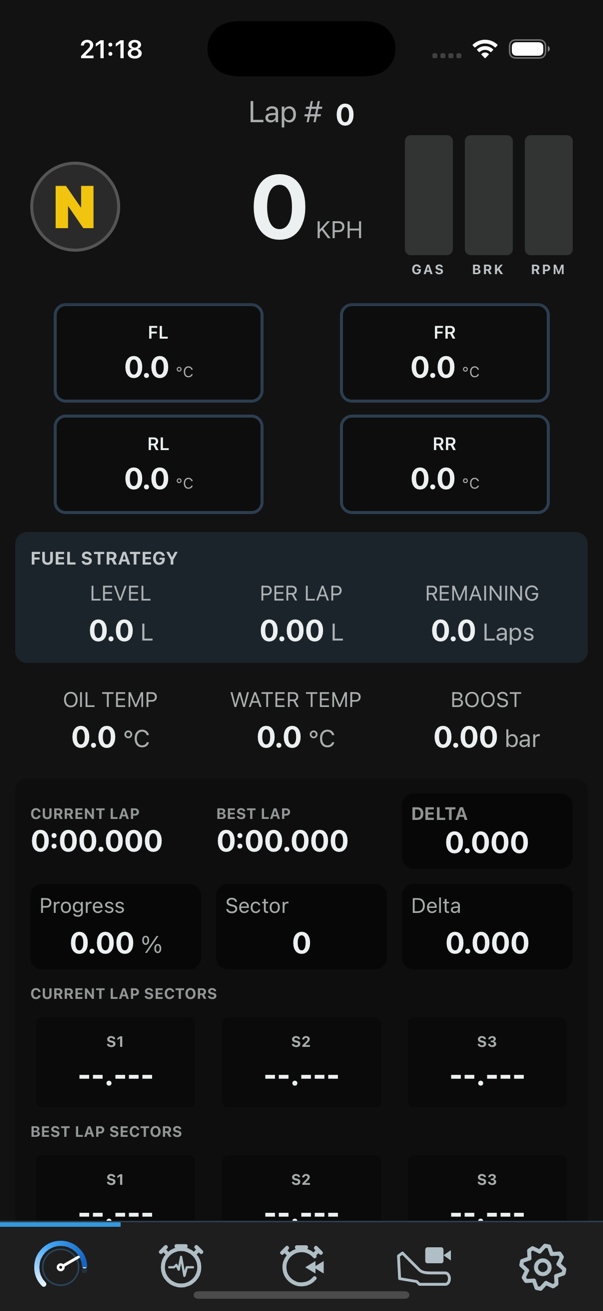
AC Telemetry Data Available
Assetto Corsa broadcasts a rich UDP telemetry packet from the physics engine. All fields below are available in Driver Apex.
| Data Field | Available | Notes |
|---|---|---|
| Speed (km/h) | Yes | Live from physics engine |
| Throttle position | Yes | 0-100% |
| Brake pressure | Yes | 0-100% |
| Clutch position | Yes | |
| Steering angle | Yes | |
| Gear + Engine RPM | Yes | |
| Current lap time | Yes | |
| Best lap time | Yes | |
| Lap delta | Yes | Live vs best lap |
| Track name | Yes | Sent in handshake - auto-detected |
| Car name | Yes | Sent in handshake |
| 3D car position | Yes | Used for track recording |
| Tyre temperatures | No | Not in AC UDP packet |
| Fuel level | No | Not in AC UDP packet |
| Turbo / boost | No | Not in AC UDP packet |
Features in Assetto Corsa
Live Telemetry Dashboard
Speed, gear, RPM, throttle, brake, clutch, steering angle, current lap time, best lap, and live lap delta - all updated from the AC physics engine in real time.
Corner-by-Corner AI Coach
Post-lap analysis from an on-device language model. Critical, moderate, and minor coaching notes per corner covering throttle application, braking points, and steering input.
Predictive Turn Analysis
Real-time corner feedback as you drive. No model download needed. Feedback is generated on exit from each corner and displayed instantly.
Auto Track Name Detection
AC sends the track name in the UDP handshake. The app reads it automatically. You do not need to enter circuit names manually as you would with GT7.
Track Recording
For DLC or new circuits not yet in the built-in database, drive one lap in the centre and the app records the layout. The track is saved and used for all future sessions.
Lap History
Last 10 laps per car and track combination, with full sector splits, timestamps, and per-lap coaching notes stored on-device.
Common AC Questions
- Does Driver Apex work with Assetto Corsa on PS4 and PS5?
- Yes. No mods are required. AC on PlayStation broadcasts UDP telemetry natively and Driver Apex receives it automatically when both devices are on the same Wi-Fi.
- The app shows the track name. Do I still need to drive a mapping lap?
- Only for tracks you have not recorded before. If the track is already in the app's database, no mapping lap is needed. For any unrecorded track, drive one lap in the centre and tap Record Track before you start.
- Why are tyre temperatures not available for AC?
- Assetto Corsa's UDP telemetry packet does not include tyre temperature data. This is a limitation of the game's telemetry spec, not the app.
- Which game modes does AC telemetry work in?
- Time Trial and Hotlap modes provide the best telemetry data. The app works in both modes on PlayStation 4 and PlayStation 5.
- Does the app work with DLC tracks?
- Yes. AC sends the track name automatically in the telemetry handshake. If a DLC track is not yet in the app's database, use Record Track: drive one full lap in the centre and the app saves the layout for future sessions.
Get Started
Start Your Assetto Corsa
Free Trial Today.
2 months free. All features included. EUR 5.99/month after. Cancel anytime.
See Pricing